目录
base
playbook 逻辑控制语句
- when:条件判断句,类似于编程语言中的 if
- loop: 循环语句,类似于编程语言中的 while
- block: 把几个任务一个代码块,以便于针对一组操作的异常进行处理等操作。
获取 ansible 远程主机系统信息
# ansible bj-db -m setup
ping 测试远程主机连通性
# ansible bj-db -m ping
在远程主机上执行命令
# ansible bj-db -a '/bin/echo leslie_test'
从本地复制文件到远程
# ansible bj-db -m copy -a 'src=/home/leslie/binlog-parser dest=/tmp/binlog_parser_leslie_test'
安装软件包
# ansible bj-db -m yum -s -a 'name=httpd24 state=latest'
添加用户
# ansible bj-db -m user -s -a 'name=foo password=<123@123>'
下载 git 仓库
# ansible bj-db -m git -a 'repo=<ssh://git-codecommit.ap-southeast-1.amazonaws.com/v1/repos/git_test> dest=/tmp/leslie_test_git version=HEAD'
启动服务
# ansible bj-db -m service -s -a 'name=httpd state=started'
并行执行
# ansible bj-db -a '/sbin/reboot' -f 10
指定使用主机清单文件
# ansible -i ansible-test/test.ini all -m setup
ansible.cfg
# sudo apt-get install ansible

# ansible bj-db -m ping
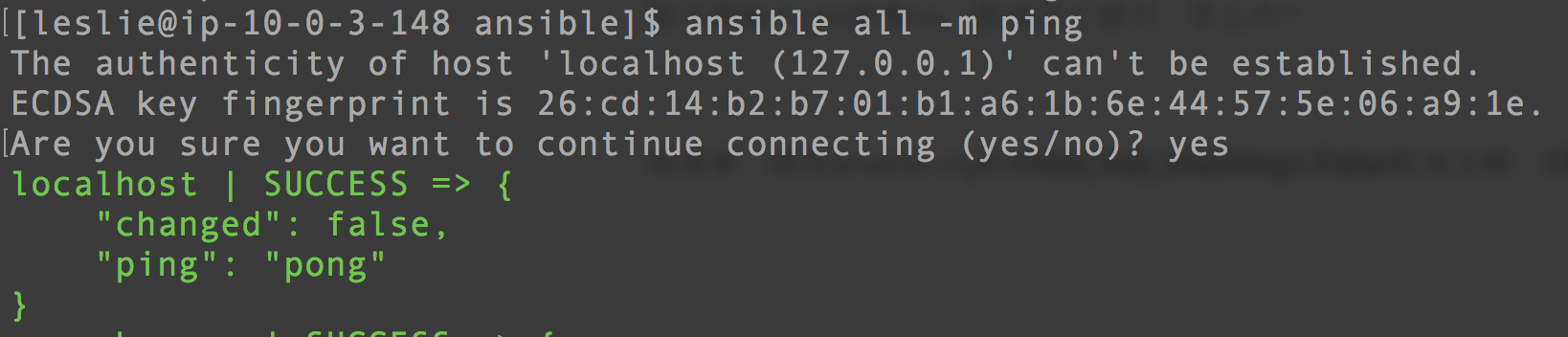
在 ansible.cfg 中设置成 host_key_checking= False,可以默认接受位置的主机
ansible.cfg 配置文件的读取顺序
默认配置文件路径 /etc/ansible/ansible.cfg
ANSIBLE_CONFIG(an environment variable)ansible.cfg(in the current directory).ansible.cfg(in the home directory)/etc/ansible/ansible.cfg
1.5 版本以前的顺序
ansible.cfg(in the current directory)ANSIBLE_CONFIG(an environment variable).ansible.cfg(in the home directory)/etc/ansible/ansible.cfg
inventory清单文件
配置文件中的常用参数配置:
| 参数 | 说明 |
|---|---|
ansible_ssh_host | 目标主机地址 |
ansible_ssh_port | 目标主机端口,默认 22 |
ansible_ssh_user | 目标主机用户 |
ansible_ssh_pass | 目标主机 ssh 密码 |
ansible_sudo_pass | sudo 密码 |
ansible_sudo_exe | sudo 命令路径 |
ansible_connection | 与主机的连接类型,比如:local、ssh 或者 paramiko |
ansible_ssh_private_key_file | 私钥地址 |
ansible_shell_type | 目标系统的 shell 类型 |
ansible_python_interpreter | python 版本 |
在 ansible.cfg 文件中定义
inventory = /etc/ansible/hosts
定义主机、主机组
mail.example.com

[webservers]
foo.example.com
bar.example.com

[dbservers]
one.example.com
two.example.com
three.example.com

[webservers]
www[01:50].example.com

[databases]
db-[a:f].example.com
组中包含子组
[atlanta]
host1
host2

[raleigh]
host2
host3

[southeast:children]
atlanta
raleigh

[usa:children]
southeast
northeast
southwest
northwest
免密示例:
localhost ansible_ssh_user=leslie ansible_ssh_private_key_file=/home/leslie/.ssh/servers/leslie_qi_BeijingTest.pem

[www.chope.info](http://www.chope.info/) ansible_ssh_user=leslie ansible_ssh_private_key_file=/home/leslie/.ssh/servers/Leslie_Qi.pem

172.31.8.5 ansible_ssh_user=leslie ansible_ssh_private_key_file=/home/leslie/.ssh/servers/leslie_qi_BeijingTest.pem

[bj-web]
localhost ansible_ssh_user=leslie ansible_ssh_private_key_file=/home/leslie/.ssh/servers/leslie_qi_BeijingTest.pem

[bj-db]
172.31.8.5 ansible_ssh_user=leslie ansible_ssh_private_key_file=/home/leslie/.ssh/servers/leslie_qi_BeijingTest.pem

[bj-server:children]
bj-web
bj-db
Inventory 参数的说明
ansible_ssh_host将要连接的远程主机名。与你想要设定的主机的别名不同的话,可通过此变量设置。ansible_ssh_portssh 端口号。如果不是默认的端口号,通过此变量设置。ansible_ssh_user默认的 ssh 用户名。ansible_ssh_passssh 密码(这种方式并不安全,我们强烈建议使用--ask-pass或 SSH 密钥)。ansible_sudo_passsudo 密码(这种方式并不安全,我们强烈建议使用--ask-sudo-pass)。ansible_sudo_exe(new in version 1.8) sudo 命令路径(适用于 1.8 及以上版本)。ansible_connection与主机的连接类型。比如:local、ssh或者paramiko。Ansible 1.2 以前默认使用paramiko,1.2 以后默认使用smart,smart方式会根据是否支持 ControlPersist 来判断ssh方式是否可行。ansible_ssh_private_key_filessh 使用的私钥文件。适用于有多个密钥,而你不想使用 SSH 代理的情况。ansible_shell_type目标系统的 shell 类型。默认情况下,命令的执行使用sh语法,可设置为csh或fish。ansible_python_interpreter目标主机的 python 路径。适用于的情况:系统中有多个 Python,或者命令路径不是/usr/bin/python,比如 *BSD,或者/usr/bin/python不是 2.X 版本的 Python。我们不使用/usr/bin/env机制,因为这要求远程用户的路径设置正确,且要求python可执行程序名不可为 python 以外的名字(实际有可能名为 python26)。 与ansible_python_interpreter的工作方式相同,可设定如 ruby 或 perl 的路径。
常用模块
- 调试和测试类的模块
ping:测试远程主机连通性debug:调试模块,打印一些简单的消息
- 文件类的模块
copy:从本地复制文件到远程节点template:从本地复制文件到远程节点,并进行变量的替换。file:设置文件属性
- Linux 上的常用操作
user:管理用户账户yum:安装软件包service:管理服务firewalld:管理防火墙
- 执行 shell 命令
shell:在节点上执行 shell 命令,支持$HOME、>、<、|、;和&command:在远程节点上面执行命令,不支持$HOME、>、<、|、;和&
ansible-playbook
查看影响了哪些主机
# ansible-playbook -i xxxx.ini --list-hosts
并行执行脚本
# ansible-playbook -i play-book.yml -f 10
role
初始化 roles
# ansible-galaxy init
定义 role 完整的目录结构
下面的目录结构定义了一个 role:名字为 myrole。Playbook 文件中 site.yml 调用了这个 role。
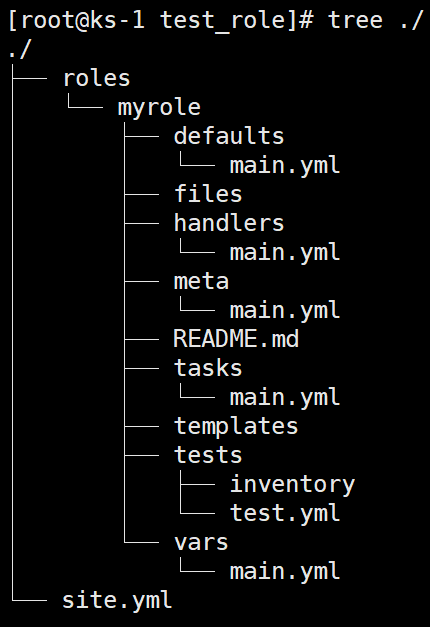
每个目录和文件的功能:
- 如果 roles 文件
roles/myrole/tasks/main.yml存在,则文件中列出的任务都会被添加到 Play 中。 - 如果文件
roles/myrole/handlers/main.yml存在,则文件中列出 handler 都将被添加到 Play 中。 - 如果文件
roles/myrole/vars/main.yml存在,则文件中列出的变量都将被添加到 Play 中。 - 如果文件
roles/myrole/defaults/main.yml存在,则文件中列出的变量都会被添加到 Play 中。 - 如果文件
roles/myrole/meta/main.yml存在,则文件中列出所有依赖的 role 都被添加到 Play 中。 - 此外,下面的文件不需要绝对或者是相对路径,和放在同一个目录下的文件一样,直接使用即可:
copy或者script使用roles/myrole/files下的文件template使用roles/myrole/templates下的文件include使用roles/myrole/tasks下的文件
而在写 role 的时候,一般都要包含 role 入口文件 roles/myrole/tasks/main.yml,其他的文件和目录,可以根据需求选择是否加入。
ansible-galaxy 命令行工具可用于管理 Ansible 角色。
查看当前存在的 role
# ansible-galaxy role list
初始化一个 role
# ansible-galaxy role init os-init
默认情况下,Ansible 在 Ansible Playbook 所在目录的 roles 子目录中查找角色。
如果 Ansible 无法在 roles 找到角色,它会按照顺序在 Ansible 配置设置 roles_path 所指定的目录中查找。
roles_path 配置
此变量包含要搜索的目录的冒号分隔列表。此变量的默认值为:
# grep roles_path /etc/ansible/ansible.cfg
# roles_path = ~/.ansible/roles:/usr/share/ansible/roles:/etc/ansible/roles
在使用 ansible-galaxy role init os-init 初始化后,得到以下目录:
[qikang@gateway install-k8s-1.29.10-ansible.tools]$ tree os-init/
os-init/
├── defaults
│   └── main.yml
├── files
├── handlers
│   └── main.yml
├── meta
│   └── main.yml
├── README.md
├── tasks
│   └── main.yml
├── templates
├── tests
│   ├── inventory
│   └── test.yml
└── vars
    └── main.yml

8 directories, 8 files
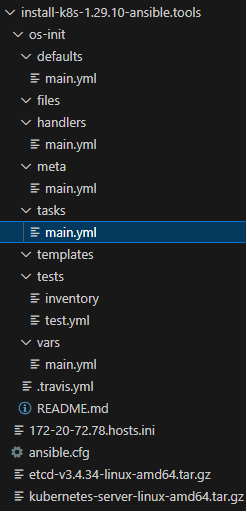
role各目录作用
defaults目录: 必须存在,目录中至少应该有main.yml文件,用于设定默认变量。变量优先级最低。files目录: 存储由copy或script等模块调用的文件;src直接指定文件名称,不需要写绝对路径。handlers目录: 目录中至少应该有main.yml文件,用于定义各 handler。其它的文件需要由main.yml进行"包含"调用。meta目录: 目录中至少应该有一个main.yml文件,定义当前角色的元数据。tasks目录: 目录必须存在,且包含一个main.yml。main.yml是 playbook 任务的入口文件。 目录下也可以存放其他任务的 yaml 文件。templates目录: 模板文件。template模块会将模板文件中的变量替换为实际值,然后覆盖到客户机指定路径上。tests目录: 存放测试相关的文件。vars目录: 角色其他的变量定义文件。